|
|
The BBC iPlayer
I'm very interested in the ongoing saga of the iPlayer, the BBC's content-on-demand service. Online rental and VOD services have been available for some time now, alongside streaming media, podcasting, iTunes and the usual slew of pirate systems, but the iPlayer is a very special case. The difference is that while other content distribution services are run as for-profit ventures whose general aim is to sell eyeballs to advertisers, the BBC is a taxpayer funded public service whose charter requires it to operate in the public interest with the stated purposes of "sustaining citizenship and civil society; promoting education and learning" [link to charter].
In the commercial model programming is used to divide the public into demographic groups of supposed gormless consumers, people with no rights whose only purpose is to be titillated and frightened into buying stupid crap they don't need. To help prevent them changing channel they're yanked around by their emotions with sensationalized 'news' coverage, fired up with sex and violence and held with dramatic cliffhangers over ad segments. This model is thus most successful when it has the greatest control over the attention of its viewers, it seeks to disempower people, lest they exercise their freedom to flip over to the competition or turn off the TV and read a book.
"Sony Connect (for itself and for its content providers) reserves the right to enforce any usage rules with or without notice to you ... your rights to access, download and use the Content are subject to immediate termination, without notice ... AND [you] HEREBY WAIVE, TRIAL BY JURY AND/OR ANY DEFENSES ..." - Sony Connect EULA
In the socalised model, by contrast, broadcasters are most successful when they best serve the interests of the public. Sure, there'll be some bickering about what those best interests are, but it still means that news can strive for objectivity, rather than ratings and that those making content can focus on what they're doing without having to be attractive to advertisers. This model serves citizens, people whose rights and self-determination are respected, it seeks to empower people. I think it's an excellent model and would love to see the BBC carry this MO into new services as new forms of media and content distribution emerge.
Because these purposes are so different, I'd expect there would be different design goals in setting up an online on-demand service for a public broadcaster than for a private one. What would such a service look like, how would it be functionally and technically different to an ad or subscription based service? I really wanted to know. So I joined the iPlayer Beta. (continues after the jump...)
Signing up
Over at http://www.bbc.co.uk/iplayerbeta/. First thing I'm told is that I'm not welcome, I run Linux and they're only serving Windows XP users with specific Microsoft software, but I already knew this and was undeterred. On to the registration form, pleasantly short, and they're not trying to harvest a crapload of unrelated data such as income and DOB to sell to spammers. Because the BBC doesn't do ads. Nice. But... there's a EULA.
It's not too bad, by the standards of the abusive, one-sided 'agreements' found elsewhere on the net. The BBC is rumored to have taken on a Microsoft executive for this project, and it shows. Pages and pages about DRM, basically telling me that my 'rights' exist only provisionally and by the momentary benevolence of wrathful powers. Whatever. This is what got me though:
The BBC may change these terms at any time by posting changes online. Please review these terms regularly to ensure you are aware of any changes made by the BBC. Your continued use of BBC iPlayer after changes are posted means you agree to be legally bound by these terms as updated and/or amended.
So some moustache growing, brandy huffing, pompous ass in a suit orders his copyright goblins to update a webpage and suddenly I have legally binding obligations, owe the BBC money and have consented to let them install the Janet Reno Striptease virus on my computer. Don't think so.
The Terms and Conditions also tell me that I agree to whatever may be in some other legal documents and fetchingly pink links are provided. I click one:
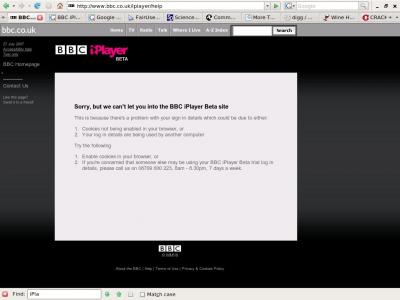
Fantastic, not only have I 'agreed' to something they're not going to let me read until I've submitted the form that says I'll be legally bound by it, but in one page they've lied to me three times, insulted my intelligence twice, asked if I liked it and then suggested I share the experience of patronizing ridicule with a friend. Oh, and they do the same if you try the link to the iPlayer FAQ at this stage. Me: "I have some questions about my rights.", BBC "403 - Forbidden". Subtle.
Anyhoo, I fill in the form and fire it off. Several days pass and an improbably named alter ego of myself receives a username and password for the iPlayer. Hi ho download! To run iPlayer on Ubuntu I set up a fairly minimal virtual XP machine with Windows Media Player 12 and a packet analyzer (demo version of Colsoft Capsa 6.4, for no good reason).
Kicking the Tires
The 'iPlayer' is a branded Kontiki implementation, presumably similar to Sky Anytime and 4oD which use the same software. The user interface takes the form of an Internet Explorer control showing locally cached html files which interact with Kontiki via Javascript. You can't browse BBC content from the player, it picks up on links clicked on the BBC site which are then played by WMP.
I've no idea why it's called the iPlayer, really more of a download manager and library system. Unless you take a cheese grater to the DRM it's not apparent how to get it working with an iPod. Maybe some young guy in the marketing department, with a smart haircut and a loud tie, thought it could piggyback on Apple's 'cool' brand or something. Remember how in the early 90s every two bit PC store was called hyper/cyber something? "Here's your 13.3 US Robotics modem, thanks for shopping at Cyber Hypernet, have a free copy of Commander Keen 2". You date yourself with names like that.
Actual impression: the plus side, quick downloads the video quality is good, the file sizes are reasonable - 140MB for a half hour show. There's a lots of content available on the BBC site, and tacked on to all of it are little notes you about the rights you don't have. You have 4 days left to download this, you can only view this for 7 days after you first open it, etc. If this was a commercial setup I'd say it was credible and on track.
The negatives: besides the obvious, Kontiki is set up to make itself extravagantly free with your upstream bandwidth, there's no dialog to throttle it or set limits and it starts silently with your computer and continues maxing out your resources even if you don't have the software 'open'. One user reported that it had used more than half his ISP's monthly allowance in less than 24 hours in a way that's completely invisible to the average user. It also chats to Microsoft servers and reports all iPlayer activity back the BBC. Here's a screenshot of a small fraction of the connections it had established within minutes of installing the software and before browsing for or downloading anything. This is all background stuff:
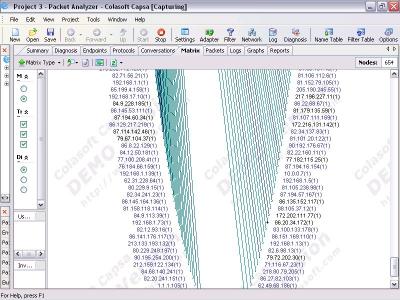
It appears I'm connected to an enormous Kontiki grid, perhaps the whole grid and routing stuff around. I read Kontiki's White Paper but it doesn't contain much actual information, it's mostly marketing bullcrap about how they're "Revolutionizing Secure Content Delivery", the list of features hints at what it's practical implementation might be, but it's not an open standard. Here's some hosts of interest from the first few minutes of activity:
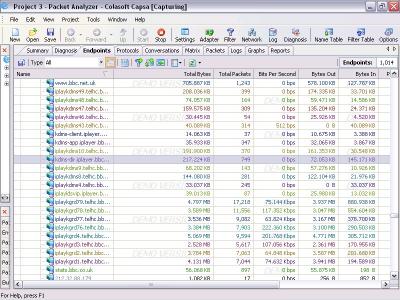
I'd suspect that the iplaykgridXX.iplayer.bbc.co.uk are seed nodes to ensure that a file always exists on a minimum number of hosts on the grid and that kdms-dir.iplayer.bbc.co.uk handles authentication of user requests for content. Your iPlayer requests a file by it's Kontiki ID and kdms-dir decides whether you can have it or not. Perhaps iplaykdmsXX.telhc.bbc.co.uk then sets you up with peers once your credentials have been checked out. That's just speculation, based on noticing that iPlayer talks HTTPS to the kdms-dir and iplaydmsXX machines and some proprietary UDP protocol to the others. Since Kontiki'd feature list includes the ability to cross firewalls, presumably it can do everything over HTTPS if needed. This may make it easier to capture conversations and make an open source client for the system, if one does not already exist.
Popping the Hood
Some registry keys in //HKLM/Software/Kontiki/iPlayer:
AuthTokenSignature: 173 characters, maybe forwardslash delimited into 5 parts. Call it a wild guess but this might be an authorization token signature of some sort.
AuthToken: iplayer_live | www.bbc.co.uk, *.iplayer.bbc.co.uk | urn:kid:bbc_iplayer_live:
net_domain: kdms-app.iplayer.bbc.co.uk perhaps this can be changed to gain access to other grids, presuming you can find credentials for them, or use a friendlier Kontiki installation (say 4oD) to download your BBC stuff.
netmanMoid: XXXXXXXX-XXXX-XXXX-XXXX-XXXXXXXXXXX I think this is your clients uniue ID on the grid (and not your unique ID in the BBC's user database)
Version: 1.2.2038
The real goods turn out to be in the Kontiki program folder in a an XML config file called zprefs_db_netman.xml.read. It's a trove of information, containing the minutiae of Kontiki setup as to how it handles p2p relationships, manages codecs and file associations and makes charades as to what alternate settings might be. Interesting lines:
<param name="peer.throttle.defaultBroadbandBGOut" type="int">96</param>
<param name="download.disablePlayReporting" type="int">0</param>
<param name="download.uploadLogURL" type="string">http://kdms-support.test.iplayer.bbc.co.uk/</param>
Some of the settings are a little mysterious:
<param name="ui.enable-bucket-brigade" type="int">1</param>
More information specific to the BBC's implementation can be found in the Kontiki/iPlayer/cache directory, consider this snippet from the file kontiki/implayer_live/cache/bbc_capability.js:
bbc.operatingSystem = {
windows: /windows/.test(ua),
mac: /mac/.test(ua),
linux: /linux/.test(ua),
unix: /x11/.test(ua) };
Which suggests that the BBC has attempted to implement iPlayer on other operating systems. This file also contains JavaScript specific to Firefox, Opera, Netscape and Safari browsers. Live streaming via Flash and Realplayer are coded for in other .js files. Modifying these files has no ill effect on the player so UI bandwidth controls are probably a easy as adding a few lines of JavaScript into the appropriate HTML file. Custom skins can be created and arbitrary ActiveX controls can probably be added to allow easy scripting or access from other programs. Inserting other content sources such as YouTube and Google video might be a fun project, a la Greasemonkey. A single interface to Sky, Channel 4 and BBC would also be neat. An ad remover for other Kontiki grids seems feasible if they all work this way. Lots of potential for creativity here.
Look under the seat
The iPlayer creates a SQLite activity/error log which contains a mass of revealing detail, including your iplayer_live_user ID and a record of offline activity, which I'd assume is synced back to the BBC when a connection becomes available. It's noteworthy that this data is in an open format and apparently vulnerable to modification. If one wanted to conceal offline activity or report false information for whatever reason, this would be the file to play with. No idea if/what checks are in place on the log and activity reporting, and don't feel like drawing attention to myself by finding out. It may be possible to recover content keys from this file, bears further looking into. Something curious and unsettling; iPlayer pre-caches previews of shows in an invisible folder called:
C:/Documents and Settings/All Users/Documents/My Deliveries
This exists if you paste it into the address bar, but windows explorer can't see it from the "All Users" folder. Wonder how that works, how deeply has Kontiki bored into my system to make that little piece of magic happen? What else is it storing on my machine I'm not aware of? And, if it can hide stuff, why is it quietly hoarding CBeebies previews in the depths of its magic folder while leaving the SQLite log out in the open? Bizarre.
Starting the Engine
Or, how to get this working on your Mac or Linux system. You'll need to be in the UK and in posession of an iPlayer account and a bbc.co.uk account. If you want to do it today, right now, you'll need to install vmware (legal, open source) set up an XP Virtual machine by installing from CD or ISO (frequently legal). I used 100MB RAM and 4GB HDD and it worked fine, use more space if you can. Download WMP12 from Microsoft or some other source (not legal, but fun!). And install the software from the link in your welcome email, assuming they let you in ;-) And get to downloading. Have a party with it. I wasn't able to use sound on my virtual machine so it's no good for watching anything (especially with so little memory), just set the downloads going and go do something else.
When you're done, close the iPlayer, kill the KHost and KService processes in the Task Manager and download yourself a copy of FairUse4WM 1.3 with Mirakagi. Run Mirkagi, this will retrieve content keys from the bowels of the DRM implementation. Use your network places to connect to the host system via SMB, share a folder if necessary. Run FairUse4WM against the large files in the My Deliveries folder, dumping the output to your SMB share. This strips the DRM, creating a file that you can actually use. Viodentia, we are in your debt. Delete the DRM'd versions, through the iPlayer interface if you want to be tidy. Exit your virtual machine.
Get pizza. Watch in VLC (or Totem or whatever). Keep the leftovers for breakfast and load any unwatched shows into your generic eBay'd mp4 player to watch on the commute to work. Sorted :-) Repeat as necessary.
Admittedly this approach is a bit of a handstand to set up, and is resource intensive, but downloading lots of TV all at once is always going to use resources. Note that the BBC may frown upon this.
Thoughts
There should be no barrier to making a WINE assembly from the XP installation and removing the virtual machine. Not very motivated to do this right now since it's only a partial solution. The thought of having a Microsoft DRM installation on my nice Ubuntu box is about as appealing as having a turd in my bed, and it's no real comfort knowing who put it there.
UPDATE - 8 Aug: The good folks at the bbciplayerlinux sourceforge project are already working on this. w00t!
It may be possible to use a Linux Kontiki implementation, VeriSign does say they support Linux or to make one from scratch. Both are too time consuming for me to consider right now and it'd be a little premature anyway. The DRM would still be a problem. Better to wait and see what happens after August 14th.
Possibilities are, as always endless. One could set up an unofficial, parallel Kontiki network without the DRM or date restrictions by using dual nodes to feed in new content. I should think implementation could take a couple weeks and a thousand pounds or so of bought or volunteered server facilities, but it would have to be somewhere well beyond the reach of the BCC, lest they send you to their Gitmo-style Radio3 Jazz Detention Centre on the Isle of Wight to be electrocuted and savaged by guard dogs. A bridge to another network would be better, and probably easier to implement but will require some serious storage and bandwidth for seeding, as well as a set (at least 10) of friendly Kontiki nodes.
In Closing
It's a real pity that BBC have decided to go with Kontiki and DRM, especially Microsoft DRM. British public broadcasting should not be in the hands of or require a tax to huge American corporations, especially when there are open-source, free alternatives available. The Democracy platform (currently Miro) is perfect for this project. Ideally matched to both the the operational needs of the BBC and the public interest. It's available for all major platforms, is well supported, uses standard and open protocols, plays anything and is highly versatile in the face of different individuals needs. It's the shizznit, and is run freely in the public interest based on ideals of participatory media and citizenship, exactly as the BBC's Charter requires them to operate. Not to mention the BBC Trust's obligation to "exercise rigorous stewardship of public money" while "ensur[ing] that the BBC observes high standards of openness and transparency."
The Microsoft DRM definitely has to go, one way or another. The world often changes faster than people do and I get the impression that senior figures in the Beeb think of VOD as an extension to traditional broadcasting. It's not. VOD is as different to broadcasting as an automobile is to a horseless carriage. Using DRM to enforce VOD viewing along a broadcasting schedule misses the whole point of Video On Demand, which is to be freed of the physical limits of the transient radio signal. If it must be compared to a traditional model, the public library is a much closer analogue, and DRM is a hay rack on a Model T.
The official line is that the BBC has chosen DRM due to pressure from partners, how true this is I can't say. If the point of DRM is to control the public to meet the interests and expand the freedoms of content partners then the Trust is operating in exact opposition to their job descriptions. And it's a pity. This is a liminal period for media, and precedent is at stake. This is not just about me watching video on my Ubuntu box, I can do that without the BBC, especially since their best content is already available through other, more convenient channels. This is about challenging the ill-conceived actions of supposed public servants.
Join in! Hack something wonderful.
This blog is provided under a Creative Commons Third World Licence, you are free to modify and distribute it for non-commercial purposes, or for commercial purposes in the Third world. Attribution welcomed. Feel free to spread it around :-)
Created 2007-08-4 19:13:42 by strix and filed under hacking
Comments 
 |
|
E writes...
Long live the hacker!
"Hack has several meanings in the technology and computer science fields: a clever or quick fix to a computer program problem; a clumsy or inelegant solution to a problem; illegally breaking into a computer, generally over a network connection; or a modification of a program or device to give the user access to features otherwise were unavailable to them."
*Kick ass* post, thanks for the trouble it took to put it together...and for sharing your findings under the hood...
http://en.wikipedia.org/wiki/Hack_%28technology%29
*Kudos* to strix.org.uk! posted: 2007-08-6 04:13:01 |
 |
|
tony writes...
I just wanna watch channel 4, bbc tv on my PC in korea, Im british I think I should be allowed the right but the silly software wont allow for users from abroad, any solutions to this??? posted: 2007-08-7 05:14:28 |
|
|
|
JohnF writes...
Tony, you might want to try this out:
http://uk.slingmedia.com/page/home
You just need someone at home in the UK to set this up; and presto! No DRM, no issues with IE/Windows if you're a mac user (I think you can run VmWare/VirtualBox on Linux to run XP and this as well!) posted: 2007-08-11 03:59:48 |
 |
|
Encore writes...
The beeb are taking the pee recently, radio player keeps breaking down and now for some unknown reason I am forbiden access to parts of their site based on my IP! (Try the same thing from another PC and its fine.)
The beeb site is becoming less and less useful every day! posted: 2007-08-28 06:33:09 |
|
|
|
Alex Miller writes...
Can anyone offer a bit more specific advice on accessing BBC iPlayer from abroad using a socks proxy or a pptp tunnel? - My iPlayer worked in the UK, but now I have moved to Germany and it picks up the new IP. I have tried using a proxy in IE6, but just get the error "We are currently experiencing technical difficulties" posted: 2007-09-15 16:38:19 |
|
|
|
DaCapt writes...
Using PPTP should attack the problem. You need a "friendly place in the UK" which has a PPTP server, to which you can connect. In my case it would be a router in telehouse (whooosh), but if you know any techies in the UK, ask them. Once you've got this setup, make sure that the VPn connection is the "default gateway" (in TCP advanced settings). This means that all of your website requests will be channelled down the VPN tunnel to UK, and from there off to the net. Analogy: You've got a mate in the UK with a network, and you've run an ethernet cable across the North Sea to his house/workplace, and are using his connection to access the net. It will be slower (cuz it's all down to his bandwidth. It will use up his bandwidth (he may get pissed off) - but apart from that, as far as any web sites/bbc iplayer is concerned , you're surfing in from his connection. I wonder if there is any milage in someone setting up a hosted PPTP connection in the UK?!?! IF anyone is interested in using such a service post it here! Good luck y'all!! posted: 2008-01-12 23:40:46 |
|
|
|
John Smith writes...
If you are looking for a way to remove the DRM from files downloaded with BBCI Player then download this http://www.mininova.org/tor/862980
It enables you to burn the files and keep them forever etc. posted: 2008-01-16 23:34:03 |
|
|
|
aw writes...
porn! posted: 2008-01-24 17:49:29 |
|
|
|
haretz writes...
Hello, is there a simple, easy to follow, "how to" guide for those of us abroad who want to be able to use iPlayer, 4OD and the like? Something which doesn;t depend on having to find a friend in the UK to help you would be highly appreciated as I have none there nowadays...
It would be TREMENDOUSLY appreciated!
Thank you very much, technically-gifted minds! posted: 2008-02-7 19:48:15 |
 |
|
RiMkAsHoX writes...
Great article man!! Lot's of useful info... And I liked the pizza thing! :) posted: 2008-02-10 16:11:03 |
 |
|
Sunshine Superman writes...
Brain on 'go-slow' you don't have to go to 'Mikes' link, you can go straight to: http://www.uktvabroad.com/. Doh!
Still good info/blog on other site though....... posted: 2008-03-5 15:31:41 |
|
|
|
fluffy_mike writes...
very informative and well-written article, with most of it even making sense to a non-techie like me. Heading abroad (W Europe) soon myself and will be roaming free wifi networks with my laptop - I have friends here who could probably host me - is this possible when I'm moving around so much? thanks for any help Mike posted: 2008-02-14 03:52:49 |
|
|
|
AlwaysUpForIt writes...
For those like tony, outside the UK -
I reside in NZ, family in UK. Then setup a VPN from the NZ location. As far as iPlayer is concerned then request comes from the UK - so all is good. BTW I also pay a UK TV licence fee.
A
posted: 2008-02-16 21:11:40 |
|
|
|
AlwaysUpForIt writes...
4OD caused my machine to totally fail - couldn't finish starting up windows. It insisted on downloading Media Player 11, this turned out to be a bad idea, I had to go back to an earlier system restore point.
Still not clear of problems as I get 99% CPU usage (kservice.exe) and lock-up when doing nothing. I'm now going to try removing Kontiki and iPlayer then fresh install. I'll post again if I ever get my machine running smoothly as it once did with just iPlayer installed.
A posted: 2008-02-16 21:20:59 |
|
|
|
123321 writes...
You will onl need to use someones VPN connection to actually click the link in the bbc website, once it is in the download manager you can switch back to your normal ISP (saves your mate getting irrate cos you used up all his bandwidth!!) posted: 2008-02-20 14:24:33 |
|
|
|
Tony (Q8) writes...
Eastenders/Corrie + Champions League last night. It's great to have a choice. Keep up the good work. posted: 2008-03-5 19:11:42 |
|
|
|
Rolph Muller writes...
Google whatismyIPaddress. They have set up a UK based service. Don't support Mac so I have not gone down this road. No doubt the Beeb will try to block it at some point. And of course you have to pay for it - though not expensive. posted: 2008-02-27 06:44:29 |
 |
|
chris writes...
I'm in South Africa and can watch iplayer stuff. The set up was pretty simple: a proxy server (CCProxy on Windows 2003) in the UK. Fortunately my company has a server there, so we put a proxy on it. We pointed internet explorer to it via the LAN Connections proxy settings, and we're away. I didn't install iPlayer... no way! I can't afford the bandwidth of being a peer server on a 4GB/month (yes, I'm in Africa) ADSL cap.
Interestingly, it appears that the video downloads on a port other than 80 - so the video traffic doesn't seem to go through the proxy server - just the initial authorization requests and GEO IP checks, I think. If this is true, and you don't use iPlayer by the Flash/WM viewer, then anyone who installs a proxy server for you shouldn't suffer any ill consequences of providing you with this. posted: 2008-02-29 18:29:29 |
|
|
|
Sunshine Superman writes...
Follow 'Mikes' link re 'FLICKR'. Tried it in last few days and 'Eurflippinreqa'!! If you want to get near live broadcasts or use your pc as a recorder and playback later, this is it. ITV1,2,3 & 4 + pay as you go Sky, C4 & C5 it here and now. Still no idea of what else may be possible but for what you get, it's got to be the best value for money (and working) answer yet and I know, I've been looking long enough. posted: 2008-03-5 14:13:18 |
|
|
|
Mike writes...
Could this be the answer to Expat prayers?
found this link to someone on Flickr who claims to have "cracked" it ?
http://www.flickr.com/photos/veta_mark/2311675401/
Has anyone tried it? posted: 2008-03-5 13:42:04 |
 |
|
PAULA writes...
It was only a matter of time before someone produced the goods. A quality product at a sensible price - I HATE rip offs and satelite! Please pass this on to friends etc. posted: 2008-03-5 19:18:49 |
 |
|
Sandi Gall writes...
This solution is a rip-off (http://www.uktvabroad.com/). £127.87 for an initial auth request through the proxy. Nice money! posted: 2008-03-11 15:14:47 |
|
|
|
Mike writes...
Hi Sandi,
Could you please offer us a cheaper, reliable alternative solution.
Where I live , a 4.2m satellite dish is necessary to watch UK TV, and this solution works out a LOT less expensive than buying a SKY+ box, and subscribing to SKY !!
I reckon those who don't even have THAT option ( say USA, Oz, Far East )would like to hear your advice for another option and pricing details.
posted: 2008-03-13 14:46:50 |
|
|
|
David writes...
vpngates.com will fix you up for US$15/month, US$40/3 months, or US$70 for 6 months. posted: 2008-03-15 00:38:47 |
|
|
|
geeky dave writes...
i've just signed up with thebox.bz torrent site for loadsa uk proggies - at first it wuldnt let me sign up but i just left the page running and a sign up box appeared after 20 mins posted: 2008-03-23 14:08:44 |
 |
|
geeky dave writes...
i've tried hypercam 2 in order to screen record iplayer - the video works but the sound hums - barely audiable - any ideas any1? posted: 2008-03-23 14:10:48 |
|
|
|
SunshineSuperman writes...
I am also interested in Sandi Galls supposed magic answer - but still no details!! posted: 2008-03-26 14:28:44 |
|
|
|
SunshineSuperman writes...
Sorry 'Geeky Dave' just wasting eveyones time! All feed back re 'thebox.biz' says it's a waste of time - you need to be invited to join but membership is full and all you get are posted shows. www.uktvabroad.com is mostly live and definately accessible! Not everything is free!! posted: 2008-03-26 15:02:21 |
|
|
|
Anonymous writes...
Download BBCi flivs using 'Replay Media Catcher'. It's is very very simple program to use.
Simply install, open and press record. Open bbci program you want to download. Play the
video. Replay Media Catcher will self activate and will begin downloading the fliv. After
download has completed go to tools/ open storage directory, this is where you will find your
fliv file. Play using a fliv player. The will be NO DRM in the fliv, therefore NO expiry
date. If you want you can convert the fliv to avi. I recommend converting to avi using
Replay Media Converter as with other converters the sync goes out.
OR (for higher resolution)
Download the Windows Media File off BBCi
Locate its containing folder
C:\Documents and Settings\All Users\shared Documents\My Videos\My Deliveries\iplayer_live
(Note:I'm using XP Home Edition)
Use a program called 'Tunebite Platnium'
To remove the DRM. Tip: Download BBCi Lottery draw to experiment with as it is only 6
minutes long. When you press convert with TuneBite let it finish the whole job. Do not run
other applications or use your PC. I Also found that Tunebite conflicted with my Camtasier
Studio i.e. wouldn't let it open. After I converted the files the BBCi I removed Tunebites
from my system and Camtasier kicked in again. Tunebites does work.
Google for the programs I have informed you of
Happy viewing posted: 2008-03-28 19:08:44 |
|
|
|
Quint writes...
Download BBCi flivs using 'Replay Media Catcher'. It's is very very simple program to use. Simply install, open and press record. Open the bbci program youwant to download. Play the video. Replay Media Catcher will self activate and will begin downloading the fliv. After the download has completed go to tools/ open storage directory, this is where you will find your fliv file. Play using a fliv player. The will be NO DRM in the fliv, therefore there is NO expiry date. You can if you want convert flivs to avi. I recommend converting flivs to avi using
Replay Media Converter because with other converters the sync goes out.
For high resolution
Download the Windows Media File off BBCi
Locate its containing folder
C:\Documents and Settings\All Users\shared Documents\My Videos\My Deliveries\iplayer_live
(Note:I'm using XP Home Edition)
Use a program called 'Tunebite Platnium'
To remove the DRM. Tip: Download BBCi Lottery draw to experiment with as it is only 6 minutes long. When you press convert with TuneBite let it finish the whole job. Do not run other applications or use your PC. I also found that Tunebite conflicted with my Camtasier
Studio i.e. wouldn't let it open. After I converted the BBCi files I removed Tunebites from my PC and Camtasier kicked in again. Tunebites does work.
Google for the programs I have informed you of
Happy viewing posted: 2008-03-28 19:19:55 |
|
|
|
joannadingle writes...
Could anyone send me an invitation for thebox.bz torrent. They are at maximum capacity and will only let people in by invite. Pretty please. Email to [email protected] Thanks! posted: 2008-04-2 20:27:01 |
|
|
|
Hugh writes...
Just a note to congratulate you on this article. The opening paragraphs are a pleasure to read and there is a quality of thoughtful and witty writing here that is way above normal website level.
Hat off to you, sir.
Hugh posted: 2008-04-14 18:34:58 |
|
|
|
aussie expat writes...
Ok, bit confused here. Are you guys saying 'Replay Media Catcher' will allow me to download bbc progs without having to find a uk proxy? Found one three weeks ago and got the first episode of Apprentice but kontiki (expletives removed) used up 20gig of my bandwidth over the night (i wasnt downloading stuff!!!) and the proxy wont work anymore either (not really suprised)..
Hows does 'Replay Media Catcher' bypass the IP-address problem where the server is the police, not some s/w at the client???
Aussie Expat
Lovin it here except the TV is cr*p.
PS. Nice one stix - kept me sane! posted: 2008-04-25 09:34:54 |
|
|
|
roger writes...
A UK proxy server is indeed the answer. Free ones are hard to find and usually don't stay available for long. You get what you pay for! Try this - it's not free but it does work well and is reliable.
http://www.sendhere.info/BBCiPlayer.html
posted: 2008-05-5 15:03:40 |
|
|
|
The Concept writes...
hmmm... interesting.
posted: 2008-05-7 09:09:28 |
|
|
|
lem0n writes...
just kill kservice.exe from taskmanager everytime u restart if ure lazy :p posted: 2008-05-18 17:10:46 |
|
|
|
Greg writes...
Have you tried using a Slingbox? My mate's got it & it's brilliant! Just set it up at your home in the UK & you can watch all your favourite British TV programmes TOTALLY FREE!! http://uk.slingmedia.com posted: 2008-06-20 23:10:27 |
 |
|
Gyran writes...
I am using a free proxy to connect up. Let me clarify something that was already mentioned. I connect to the site using my normal isp. I switch to the proxy just before I click download. Once download as started you can pause and swap back to your normal isp. You will have to swap back briefly before you play the file as the BBC check the ip address as it sends you the DRM file. posted: 2008-07-6 17:21:47 |
|
|
|
Steve writes...
I,m on xp pro sp2 using wmp11 and this works a treat with bbciplayer
Takes off drm and coverts fast
Burning no prob after
Best not keep updating your bbc player, cause they will no doubt manage to stop it working
http://www.fulldls.com/download-app-303604-FairUse4Wm,mirakagi,%20FairUseCommander.torrent
posted: 2008-07-15 19:52:10 |
|
|
|
Chris writes...
In reply to Tony:
I just wanna watch channel 4, bbc tv on my PC in korea, Im british I think I should be allowed the right but the silly software wont allow for users from abroad, any solutions to this???
Use a program (free) called the Zattoo player - free internet streaming of all the major channels. posted: 2008-07-22 06:58:32 |
|
|
|
Mike writes...
Does anyone know how to block BBC Media Player (flash) content for the likes of olympics videos direct from the BBC website??
Tia, Mike posted: 2008-08-18 19:18:59 |
|
|
|
george writes...
anyone suddenly not able to capture bbci with replay media catcher? posted: 2008-09-3 18:22:06 |
|
|
|
Deano writes...
Why don't you try www.uknova.com - I use it daily to watch tv back home. Free of charge, high quality recording and no nasty viruses. I've got cable here in Singapore with BBC24 news and BBC Entertainment (kak). UK Nova is genius! posted: 2008-09-7 07:46:28 |
|
|
|
Roger writes...
I found 3 ways of accessing BBC Iplayer from abroad here
www.consult-here.com/BBC.html
Have tried them all and they all work! posted: 2008-09-14 13:26:16 |
|
|
|
moshimoshi writes...
Replay Media Catcher (2.3) used to work like a charm, but not any more (no proxy issues here, I'm talking about downloading from within the UK). It captures the channel 'ident' video ok but not the show which follows. This has only just happened. Works great for other web video, just not the iPlayer. On the RMC website they suggest going to version 3 but they don't say why that would work when the old version doesn't... so I'm sceptical. Someone get on it please!
But there's hope. Anyone with a usenet account can see that someone is recording BBC shows and sticking them in a.b.documentaries, it's just a matter of finding out how they're doing it :) posted: 2008-09-24 23:16:24 |
|
|
|
moshimoshi writes...
Replay Media Catcher (2.3) used to work like a charm, but not any more (no proxy issues here, I'm talking about downloading from within the UK). It captures the channel 'ident' video ok but not the show which follows. This has only just happened. Works great for other web video, just not the iPlayer. On the RMC website they suggest going to version 3 but they don't say why that would work when the old version doesn't... so I'm sceptical. Someone get on it please!
But there's hope. Anyone with a usenet account can see that someone is recording BBC shows and sticking them in a.b.documentaries, it's just a matter of finding out how they're doing it :) posted: 2008-09-24 23:16:24 |
|
|
|
moshimoshi writes...
Further to my above problems with Replay Media Catcher (and I see George mentions it a few posts above) there's an interesting discussion re Orbit Downloader in their forums and why changing the IP address of the server seems to work (a tweak you can do in Orbit in the course of finding the true url with their addon Grab++). That's here: http://forum.orbitdownloader.com/viewtopic.php?id=54755&p;=2
Again just for peeps in the UK, not a proxy issue, just a "some servers work, some don't" issue. posted: 2008-09-24 23:56:52 |
|
|
|
Anonymous writes...
posted: 2008-10-10 19:50:37 |
|
|
|
chris writes...
hey all! hope this might help...i´m in spain and just found this site for watching BBCiplayer abroad. www.uktelly.tv works really well...i did the trial and nthen subscribed...amazing! had top gear on mu plaza last night...try it out ps i also downloaded BBC podcasts to my ipod that are usually blocked outside the uk. posted: 2008-11-21 11:20:31 |
 |
|
UnderFiveDollars writes...
By far the cheapest way to see iPlayer / Zattoo / etc. from abroad is with a UKiVPN service (www.ukivpn.com). It costs under $5 a month and works perfectly. posted: 2008-12-4 20:20:26 |
|
|
|
juan angel writes...
youtube has videos explaining how! :) posted: 2008-12-22 13:22:04 |
|
|
|
Anonymous writes...
consult-here.com is a scam - all they send is a useless PDF. posted: 2008-12-24 22:35:38 |
|
|
|
Anonymous writes...
OK - I have to backtrack - consult-here.com is NOT a scam but you have to careful what you order for - VPN or a PDF on how to get around geographical restrictions. posted: 2008-12-25 14:08:16 |
 |
|
Mast writes...
FairUse4wm works for both BBC iPlayer and 4oD. Download the programme and run FairUse and it will create a new .wmv file with no DRM. Only problem I have found is that if the programme is in wide screen format it will play in wide screen format on your PC but if you try to burn it to DVD for use in normal DVD players it changes the screen format to 4:3. I am using Roxio 2009 and I can't find any way round this. Any one else having the same problem? posted: 2009-01-5 12:15:04 |
|
|
|
EZ writes...
'eztv' for all your UK tv.. posted: 2009-01-31 07:38:03 |
|
|
|
Anonymous writes...
"On the RMC website they suggest going to version 3 but they don't say why that would work when the old version doesn't... so I'm sceptical. Someone get on it please!"
After finding Version 2 wasn't working. I tried V 3.2. Works (as of March 1 '09). I can watch the downloaded files with the flash player they provide, but for some reason it's failing to covert them into other file formats at present. posted: 2009-03-2 02:51:19 |
|
|
|
Anonymous writes...
Applian Technologies report: "Neither Media Catcher or Replay Converter is able to convert BBC iPlayer files as of right now. We are working on an update to Replay Converter that will be able to handle these files." (March 2nd '09)
In the meantime it is possible, as I said, to capture the stream with Replay Media Capture V3.2, replay the program using their Applian Flash Video Player (free) and screen capture it to an AVI using Applian Replay Video Capture. Long-winded, but a solution.
posted: 2009-03-2 14:42:01 |
|
|
|
Anonymous writes...
Applian Technologies report: "Neither Media Catcher or Replay Converter is able to convert BBC iPlayer files as of right now. We are working on an update to Replay Converter that will be able to handle these files." (March 2nd '09)
In the meantime it is possible, as I said, to capture the stream with Replay Media Capture V3.2, replay the program using their Applian Flash Video Player (free) and screen capture it to an AVI using Applian Replay Video Capture. Long-winded, but a solution.
posted: 2009-03-2 14:42:01 |
|
|
|
Anonymous writes...
I used TOR for a quick test (set a list of UK exit nodes in the config file and turned on strict exits)... that worked, but you're an ass if you load a TOR circuit this way and 3 hops adds a heap of latency (though you can lower that to two)
Next I wrote a simple app to tunnel over a single TOR hop (pretending to be a relay node for a phantom client and entry node)... this reduced the latency and sped things up considerably. But, like I say... this is an abuse of TOR. Still, faster and more reliable than a proxy... and you only need it for one click (for actually streaming you can turn off the TOR and go direct, so you ain't loading TOR with your bandwidth)
This is beacause you ONLY need a UK IP to kickstart the download. With the BBC and 4oD you can do it all from Web+Kontiki... and you don't need their player installed (or an IP address) at all... in fact, you don't need Kontiki installed either. You just have to talk 'tiki', 'http' and know a little VB.
But I don't like bolting on apps and local proxies to get stuff working... so, I kept searching. And the good news is, you don't need a UK IP (or UK proxy/tunnel) for ANY of the UK broadcasters.
After dealing with the BBC (using greasemonkey script) and 4oD (which is actually IE+flash frontend to the weak kontiki delivery platform) I turned on the ITV service...
Looked bad at first: the player is MSsilverlight and very screwed up. However, a simple greasemonkey script takes the 'Filter=' (also known as the clid) from Javascript 'initialisePlayer' onClick calls and the regular links with the '5' parameter (pages with embedded video) and wraps the Filter# with the correct URL format... this bypasses their access controls and has the added advantage of using any damned player you prefer, such as VLC or Mediaplayer v11.
Now I use all three services from my browser without any silly standalone garbageware or wacky proprietary embedded players... Each site now uses MSMediaplayer11 embedded. just a few greasemonkey scripts is all you need. The 4oD is not actually channel 4's site but an HTML file on my local machine which uses javascript to pull media data off the c4 site over TLS/SSL and go grab the media from Kontiki - it's a damned sight faster, searchfriendly and useable too.
I only did all this for the giggles though. 'uknova' is *free*, fast, friendly and torrents all of the programmes you want (and if they don't their cappers will catch it for you on request) ... then theres 'tvtorrents' who do both sides of the pond and don't care whether the programme has already gone to DVD unlike uknova who are trying to keep good relations with the Broadcasters.
Besides, their torrents usually deliver MUCH faster than the broadcasters streams AND in FAR higher quality.
So... Slingboxes, paid for tunnels, shell accounts, abusing insecure proxies, abusing TOR, etc none of it is neccessary.
-GaryC
posted: 2009-03-21 20:07:21 |
 |
|
wigwam writes...
I agree with Mike G. Especially if you also want to watch Ch4 et al. as well. Try adtelly (google for it) it's very inexpensive and fast. posted: 2009-05-11 13:21:01 |
 |
|
andy pears writes...
Someone help please. BBC iplayer has been changed to use mp4 files instead of the old wmv files.
This means FairUse4Wm nolonger can strip the DRM from the file. So how do we keep the mp4 files now and decript them.
The new iplayer desktop downloader does not work as good as the download manager used to. Why has the BBC changed changed it?
Andy
posted: 2009-05-8 23:10:14 |
|
|
|
Matt writes...
I use ADTelly.tv and it works great for me for all channels posted: 2009-05-27 09:06:01 |
|
|
|
sunamistl writes...
GaryC,
If you can write step by step procedure for:
You just have to talk 'tiki', 'http' and know a little VB.
thanks if you can show us! posted: 2009-05-30 14:56:49 |
|
|
|
Martin writes...
Getting iplayer abroad is easy,(for a fiver).Signup for a VPN server in UK,i use
My Private Network.co.uk you can access a lot of UK channels from them.Have been using them for quite awhile now here in Thailand. posted: 2010-03-26 05:09:13 |
|
|
|
Chris writes...
I was watching BBC iplayer and stuff in Hong Kong, Thailand and Malaysia a few months back on my Laptop using local 3g Sim Card access and local WiFi, the only thing I can think off is I use Onspeed (installed in the UK) ok so Onspeed is £25 per year (£2 pm), but mainly use onspeed to speed up my 3g connections and to over ride those anoying Adult content restrictions. posted: 2010-03-22 06:17:57 |
|
|
|
Viktor writes...
Can anyone here hack the bbc downloads page: http://downloads.bbc.co.uk/
If you can let me know.
thanks posted: 2010-03-11 18:35:36 |
|
|
|
Anonymous writes...
Have no enough money to buy a house? Don't worry, just because it is possible to receive the home loans to resolve all the problems. Therefore get a commercial loan to buy everything you require. posted: 2010-03-13 16:31:08 |
|
|
|
Anonymous writes...
Lots of specialists claim that mortgage loans aid people to live their own way, just because they are able to feel free to buy needed stuff. Moreover, various banks give car loan for different classes of people. posted: 2010-03-14 08:40:44 |
|
|
|
Ketty writes...
I prefer socalised model, they are more successful, this model empowers people. posted: 2009-07-3 16:21:10 |
|
|
|
dental implants glasgow writes...
Latest and new things and stuff shared and presented nicely. posted: 2009-07-17 10:57:52 |
 |
|
Nicola writes...
I live in France and can access iplayer radio programs. I want to download or save a programme. I can listen to it on line but want to listen off line too. How do I do this Please explain in a way a total computer numbskull can follow!!! posted: 2010-02-10 12:42:11 |
|
|
|
Anonymous writes...
The best way out to receive a good grade was to purchase the very interesting essay writing topics or releases close to this good post, or just get know about order now choosing the essays writing organization. posted: 2010-01-13 17:56:55 |
|
|
|
Mitur Binesderti writes...
consult-here IS a total scam. All they do is tell you, "Get a UK proxy, a UK VPN, or use an anonymizer based in the UK." TOTAL scam, don't waste your money on those morons. posted: 2010-06-27 14:46:13 |
|
|
|
games download pc writes...
Terrific blog post, I share the same views. I wonder why this excellent the entire global population really does not feel just like me and additionally the web site owner
posted: 2010-10-29 02:22:51 |
 |
|
buy itune gift card writes...
Extremely helpful. I like the way you write. Do you have an RSS feed?
posted: 2010-11-1 02:02:31 |
 |
|
itunes giftcard code writes...
Great post. Keep writing such well researched post. Your blog has helped me immensely. Would wait for more such posts soon.
itunes giftcard code posted: 2010-11-4 07:26:41 |
 |
|
itunes gift email writes...
Aw, this was a really quality post. In theory I'd like to write like this too - taking time and real effort to make a good article... but what can I say... I procrastinate alot and never seem to get something done
posted: 2010-11-8 03:15:23 |
|
|
|
Anonymous writes...
posted: 2010-11-13 13:27:28 |
|
|
|
Anonymous writes...
posted: 2010-12-14 16:07:03 |
|
|
|
Atkinson35Kendra writes...
If you are willing to buy a car, you would have to receive the credit loans. Moreover, my sister all the time utilizes a short term loan, which supposes to be really rapid. posted: 2010-12-16 10:11:36 |
|
|
|
marday writes...
Dior watches replica
Ebel watches replica
Girard-Perregaux watches replica
Hublot watches replica
IWC watches replica
Jaeger-LeCoultre watches replica
omega watches replica
Panerai watches replica
Parmigiani Fleurier watches replica
Patek Philippe watches replica posted: 2011-02-23 01:41:48 |
|
|
|
marday writes...
Dior watches replica
Ebel watches replica
Girard-Perregaux watches replica
Hublot watches replica
IWC watches replica
Jaeger-LeCoultre watches replica
omega watches replica
Panerai watches replica
Parmigiani Fleurier watches replica
Patek Philippe watches replica posted: 2011-02-23 01:42:58 |
|
|
|
Paul writes...
Hey Colin from tvproxy!!! Your VPN is a complete ripoff!!!
Your VPN give the user one offshore connection in the UK and as far as I can tell is a simple PPTP setup.
You make it sound like it is your site offering the streams like for example stating "channels will only work for members" when in reality ANY IP located in the UK will work as they are 3rd party links to the broadcasters websites.
Over 90 Euros for a single VPN a year. No way. Look at expatshield for a start. A free VPN which most of the time allows channels to be streamed correctly.
I pay for my service as I need it for additional purposes but even the service I use is only 69euros a year and that gives me PPTP, IPsec and SSL connections, all can be used simultaneously in other words you could run 3 VPNs on 3 separate machines at once and all of them have a massive list of offshore connections in nearly every country around the world which can be swapped to within seconds. This allows you not only to view British TV streams and catchup but anything from the likes of Hulu and CBS in the United States too.
Not saying your VPN does not do what it says on the tin or anything, I am sure it allows streaming but given the significantly lower prices around which offer a much more versatile and robust service, how can it be worthwhile? posted: 2011-03-7 10:00:02 |
Add Comment
Subscribe to this blog by RSS.
|
|

|
|


